Getting Started with QoderWake
Install QoderWake, create a Waker, and put digital employees in the group chat — a practical Grok Bot alternative for IM-native teams.
I've been deep in Grok Bot lately — named teammates, a shared computer, handoffs that stop at my approval. Then QoderWake 1.0 shipped, and the pitch hit a nerve I care about as someone who runs AI into real teams:
Not another chatbox. A colleague.
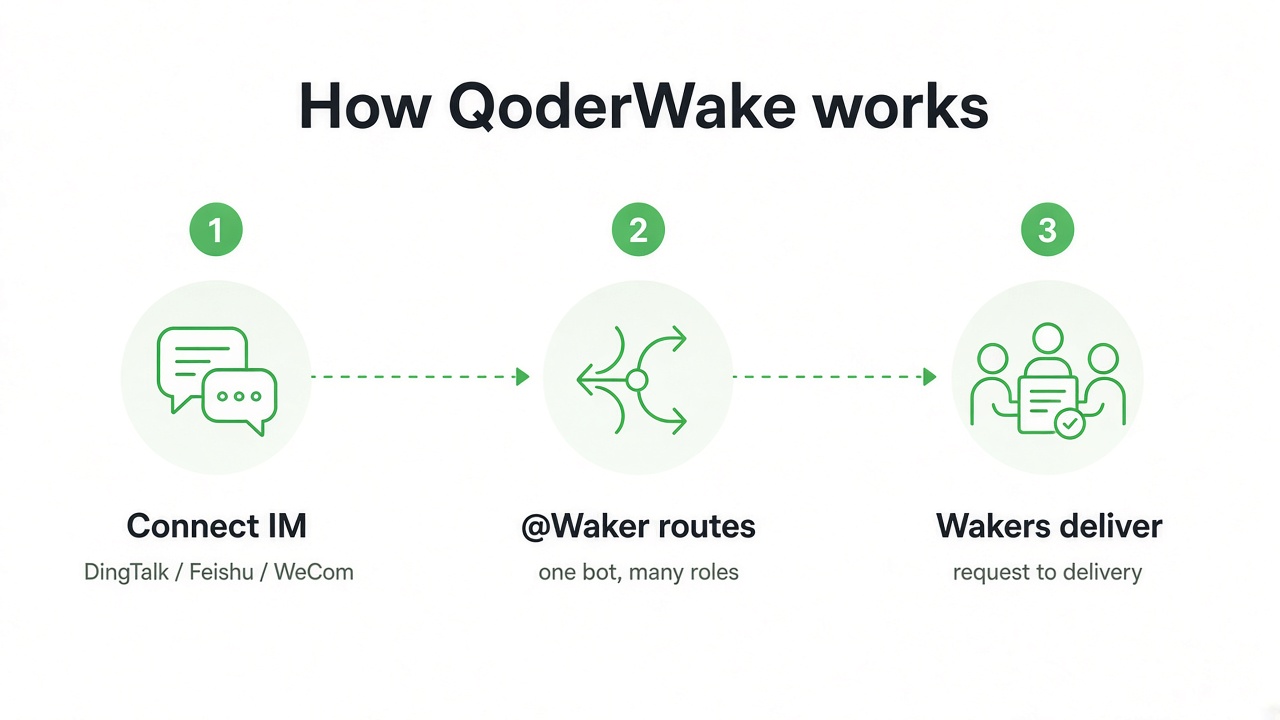
QoderWake's bet is that digital employees shouldn't live in a separate app you open when you remember. They should join the group chat, catch up on what just happened, and take work from request to delivery — inside DingTalk, Feishu, WeCom, and the rest of the IM stack your org already uses.
That is a serious Grok Bot alternative for one specific pain: the work already started in the thread. If your engineering or product decisions happen in chat (and for most Asia-Pacific teams, they do), this is the product I've been waiting to trial.
What QoderWake is
QoderWake is Qoder's runtime for digital employees called Wakers. Each Waker has a name, a role, scoped permissions, memory, Skills, connectors, and a workspace. You manage them from a local Web Console, then put them where the team already works.
Three ideas matter more than the feature list:
- @Waker in IM — one bot in the group chat; behind it, specialized Wakers route, execute, and reply in the same thread
- Groups — a Leader plus complementary roles (admin, DevOps, design) that hand off and review each other
- Autonomous Work + WakerFlow — schedules, events, and APIs for stable loops; multi-step orchestration when the process needs stages and human gates
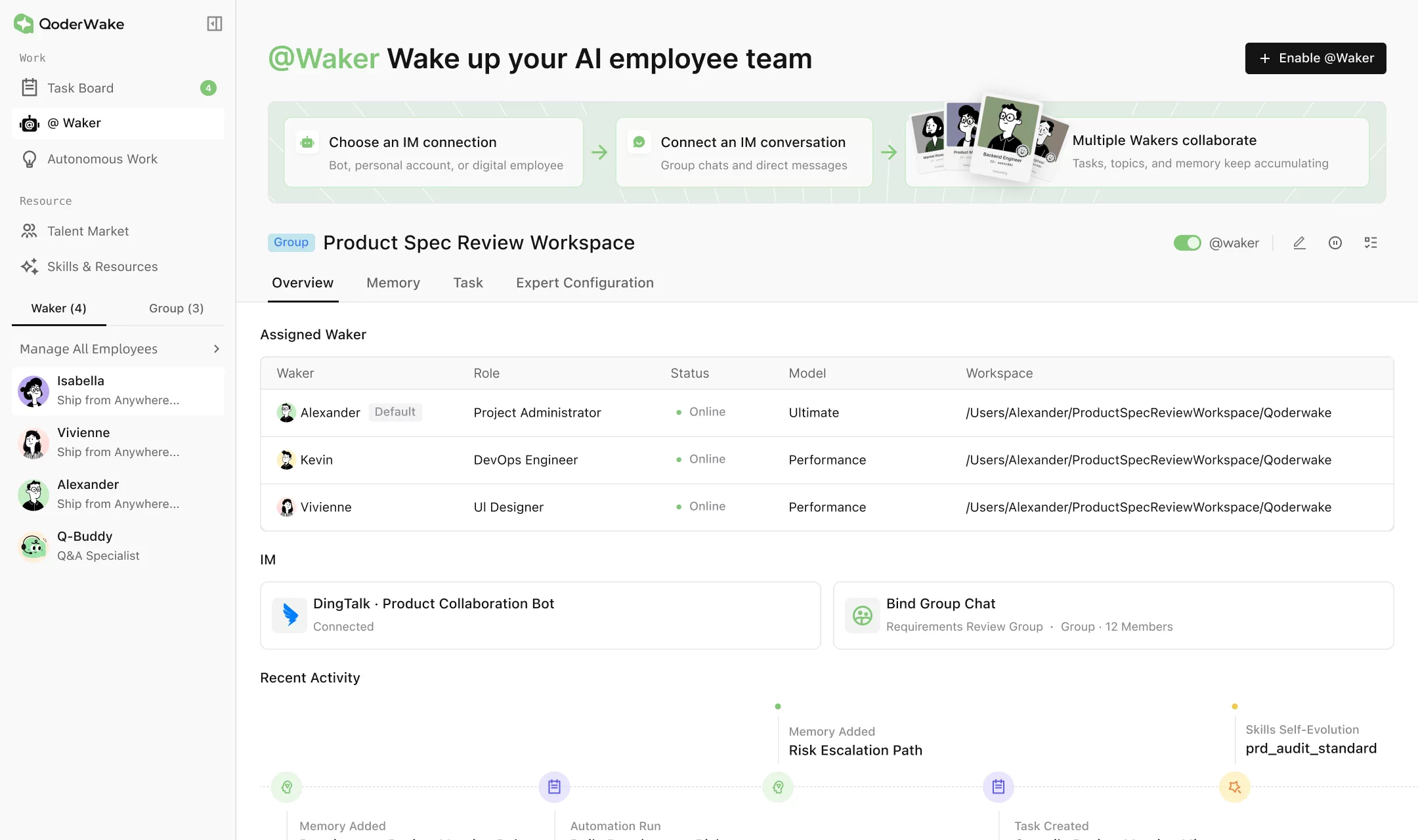
The console already feels like an employee desk, not a prompt playground. A Product Spec Review workspace, for example, can seat Alexander (Project Administrator), Kevin (DevOps), and Vivienne (UI Designer) on one shared path, bind a DingTalk group, and leave a timeline of memory, Skills self-evolution, and automation runs.
Why I'm excited (especially vs Grok Bot)
I use Grok Bot. I'm not dumping it. I'm excited about QoderWake because it attacks a different home for the same idea.
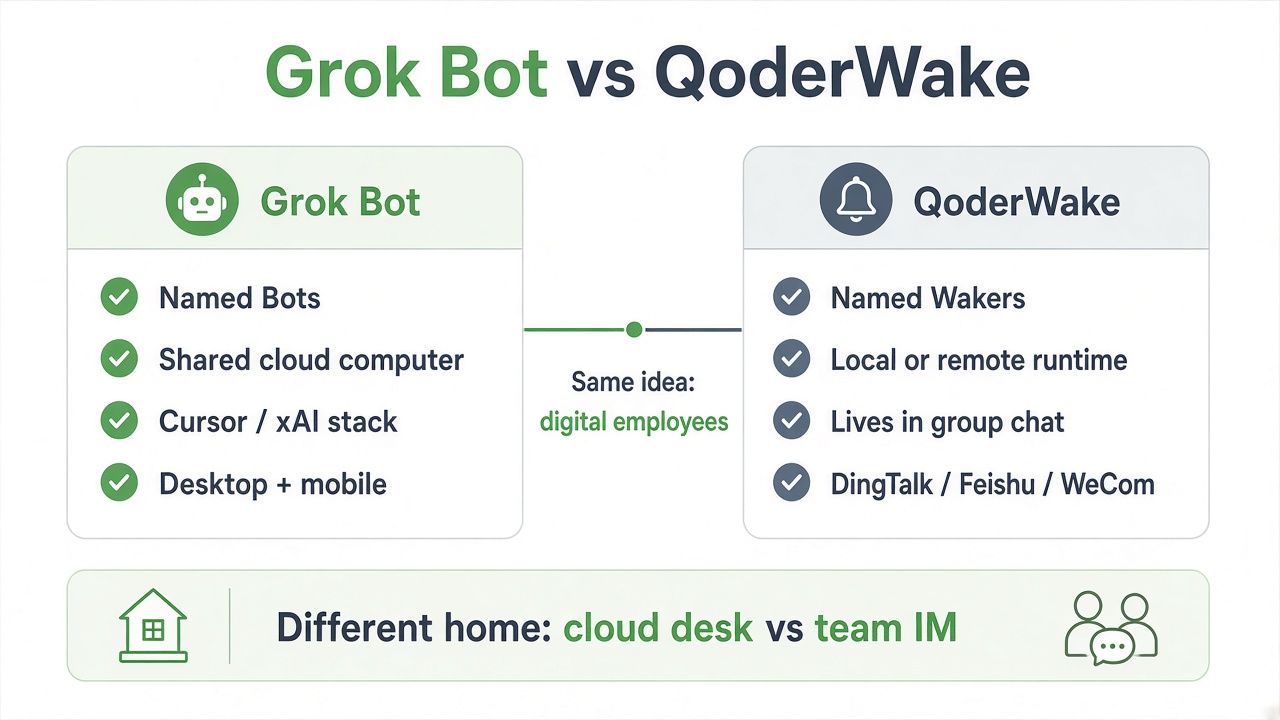
| Grok Bot | QoderWake | |
|---|---|---|
| Core metaphor | Named Bots on a shared cloud computer | Named Wakers as digital employees |
| Where the team meets it | Desktop / mobile app you open | Group chat and DMs you already live in |
| Runtime | Persistent cloud computer (browser, files, terminal) | Local or remote device; projects on a real path |
| Multiplicity | Many Bots, handoffs between them | Wakers + Groups with a Leader |
| Proactivity | Routines, skills, background turns | Autonomous Work (schedule / event / API) + WakerFlow |
| IM-native depth | Connectors into chat tools | First-class @Waker for DingTalk, Feishu, WeCom, and more |
| Best default fit | Solo or small-team work that spans CRM, browser, inbox | Org work that already lives in IM threads |
Grok Bot wins when you are the queue owner and the computer is the desk. QoderWake wins when the queue is the group chat — requirements review, incident war rooms, content ops — and you want digital employees sitting in that room with everyone else.
That's the excitement, plainly: staffing that shows up where the decision already happened, without forcing the team to open yet another agent UI.
Platforms and install
| Item | Recommendation |
|---|---|
| OS | macOS 13+, mainstream Linux, Windows 10+ |
| Memory | 4 GB+ |
| Disk | 500 MB+ free |
| Network | Outbound HTTPS to model services, repos, and connectors |
macOS / Linux (CLI):
curl -fsSL https://qoder-ide.oss-ap-southeast-1.aliyuncs.com/qoderwake/install.sh | bash
Windows: download the .exe from the QoderWake product page, run the installer, finish account auth, wait for the Web Console.
Useful commands after install:
qoderwake login
qoderwake whoami
qoderwake start --open   # or: qoderwake portal
qoderwake status
Default console is http://127.0.0.1:19820 (port increments if busy). Token login exists for headless boxes — never paste tokens into chat, screenshots, or repos.
First week in six steps
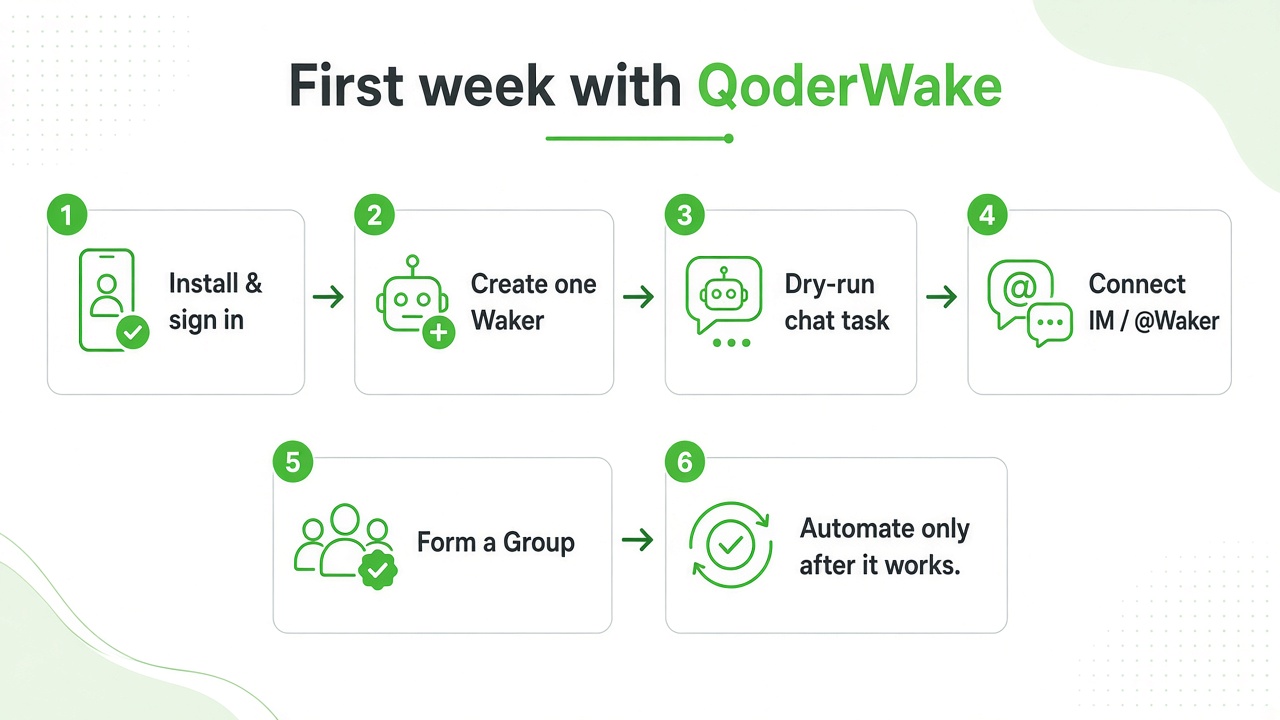
1. Install and sign in
Install, authorize in the browser, confirm qoderwake whoami and that the Web Console loads. Reopen a terminal if the qoderwake command isn't found yet.
2. Create one focused Waker
Open Waker Management → New Waker. Pick a marketplace role close to the job, or Custom. Name it, keep only the Skills / connectors / knowledge you need for the first task, and bind the runtime environment (local path or remote device).
One Waker = one stable responsibility. Don't build a catch-all.
3. Dry-run a chat task
Create a chat task on that Waker. Point it at a working directory. Start read-only:
Only read the README in the current directory — do not modify any files.
Summarize the project's purpose and how to start it in 5 bullet points or fewer;
if information is insufficient, state that clearly.
Inspect the artifact, not just the final reply. Then try a controlled write, an out-of-scope refusal, and a high-risk confirmation.
4. Connect IM and enable @Waker
Path: @Waker → IM Connection Management. Connect DingTalk / Feishu / WeCom (whatever your region exposes), pair a test group or DM, assign Wakers, pick exactly one default Waker, then turn on Wake-up Mode.
Members always @ one bot. Routing happens behind the curtain. Validate with two messages: one that should hit a specialist, one ambiguous enough to hit the default or ask for clarification.
A solid group request shape:
@bot New task: summarize the release blockers discussed today.
Scope: only this group chat and the attachments already shared here.
Deliverable: a table with owner, impact, next step, and due date.
Constraint: do not publish or modify external systems; return a plan and wait for confirmation before any action.
5. Form a Group when roles must collaborate
For work that needs implementation + review + design, create a Group, assign a Leader, give each member its own model and working directory, and define one primary writer when they share a path. Run a small validation task before you trust it with a real sprint thread.
6. Automate only after it works
Dashboard watches status. Autonomous Work starts from schedule, event, or API. WakerFlow is for multi-stage, multi-Waker, human-in-the-loop processes.
Docs' rule is the right one: validate in chat first, formalize second, automate the trigger last. Don't put an unverified task on unattended automation.
Work modes at a glance
| Entry | What it solves | Best for |
|---|---|---|
| Dashboard | Status, confirmations, failures across tasks | Tracking several jobs |
| @Waker | IM chat → specialized Wakers | Group collaboration and ongoing thread work |
| Autonomous Work | Schedule / event / API triggers | Reports, inspections, integrations |
| WakerFlow | Multi-stage orchestration | Branches, handoffs, explicit human gates |
| Group | Leader + complementary Wakers | Implementation + test + review |
Capabilities worth wiring early
| Resource | Purpose |
|---|---|
| Skills | Reusable methods (marketplace + custom; self-evolution with review) |
| Connectors | Apps, MCP services, built-in tools |
| Knowledge Base | Stable, searchable org knowledge |
| Memory | Role profile, preferences, rules — view, correct, or forget |
| Public / Private Projects | Shared vs single-Waker workspaces |
Installing a resource does not auto-enable every Waker. Assign it, check permissions, validate in a new chat. Extra unused resources just increase routing and retrieval noise.
Roles that fit the first month
| Role | Owns | Stops at |
|---|---|---|
| Project Administrator | Specs, blockers, owner tables from the group thread | Plan + table (no merge / publish) |
| DevOps Engineer | Env checks, deploy notes, runbooks in the repo path | Report + PR draft (no prod apply) |
| UI Designer | UX notes from attached mocks / threads | Spec + screens (no design-system overwrite) |
| Web Quality Engineer | Weekly site review with screenshots | Report only until remediation is a separate role |
| Group Chat Q&A Specialist | Recurring policy / product answers in IM | Answer + knowledge update (standard IM mode) |
Keep merges, production changes, external publishing, deletion, and payments behind human confirmation — same staffing instinct as Grok Bot's stop line.
Common gotchas
- Vague Waker role → mushy routing in @Waker. Narrow the lane before you enable the chat.
- Wake-up Mode off when you need multi-Waker dispatch → you get plain IM, not task memory and routing.
- Automating before a clean dry-run → unattended failure at 2am. Chat first.
- Credentials in IM or memory → use protected connection forms; never paste tokens into group chat.
- Multiple Wakers writing the same file → define one primary editor and read-only reviewers.
- Treating memory as source of truth for consequential facts → re-check the live source before you act.
Bottom line
The agent joins the thread. It does not wait in another app.
Grok Bot stays my default when I own the work and need a computer that roams across tools. QoderWake is what I put in a real team chat, DingTalk, Feishu, or WeCom, where the decision already happened and nobody wants to leave the room.
Try it once this week. One Waker. One read-only dry-run. Then @Waker in a test group you can afford to break. Groups and Autonomous Work can wait until that loop is boring.
That is enough to know if it belongs next to Grok Bot, or stays a demo.
References
Enjoyed this? Let's work together.
I help companies turn AI strategy into shipped, revenue-generating products.