Getting Started with Jev
Most production AI features are decisions, not chat. TypeSafe's Jev model returns type-safe structured answers with calibrated probabilities in 70–500ms — a practical alternative to parsing LLM JSON.
Why this matters for builders
Most production "AI features" aren't chat. They're decisions buried in code: route this ticket, score this lead, flag urgency, pick the next step.
Chat LLMs can do that if you prompt carefully, parse JSON, retry on schema failures, and accept that they might invent a label that doesn't exist. That works for demos. It breaks when the call sits inside a latency budget or five layers deep in a workflow.
TypeSafe's System One models are built for that second world. Their first public model, Jev, gives up free-form string generation and returns type-safe structured answers with calibrated probabilities — in roughly 70–500ms, with free output tokens and input pricing around $0.042 / MTok.
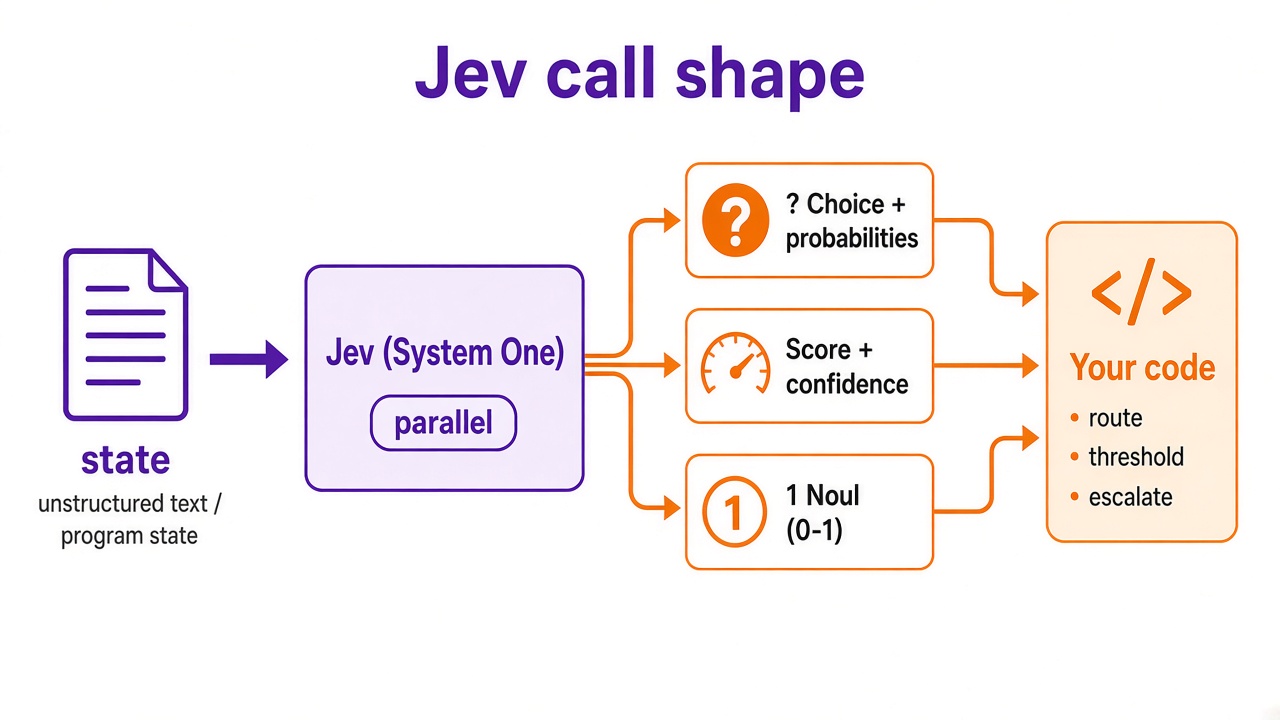
Think of Jev as a frontier-intelligence function call: unstructured state in, typed probabilistic decisions out.
What "System One" means here
TypeSafe borrows Kahneman's System 1 / System 2 framing. Jev is optimized for fast, structured decisions software can use directly — not long-form chat.
| Typical frontier LLM | Jev (System One) | |
|---|---|---|
| Training focus | Preferences / verifiable text rewards | Calibrated decisions (RLCD) |
| Outputs | Strings you must parse | Typed values + probabilities |
| Sampling | Autoregressive tokens | Parallel structured answers |
| Best fit | Chat, copilots, generation | Classify, route, score, guardrail |
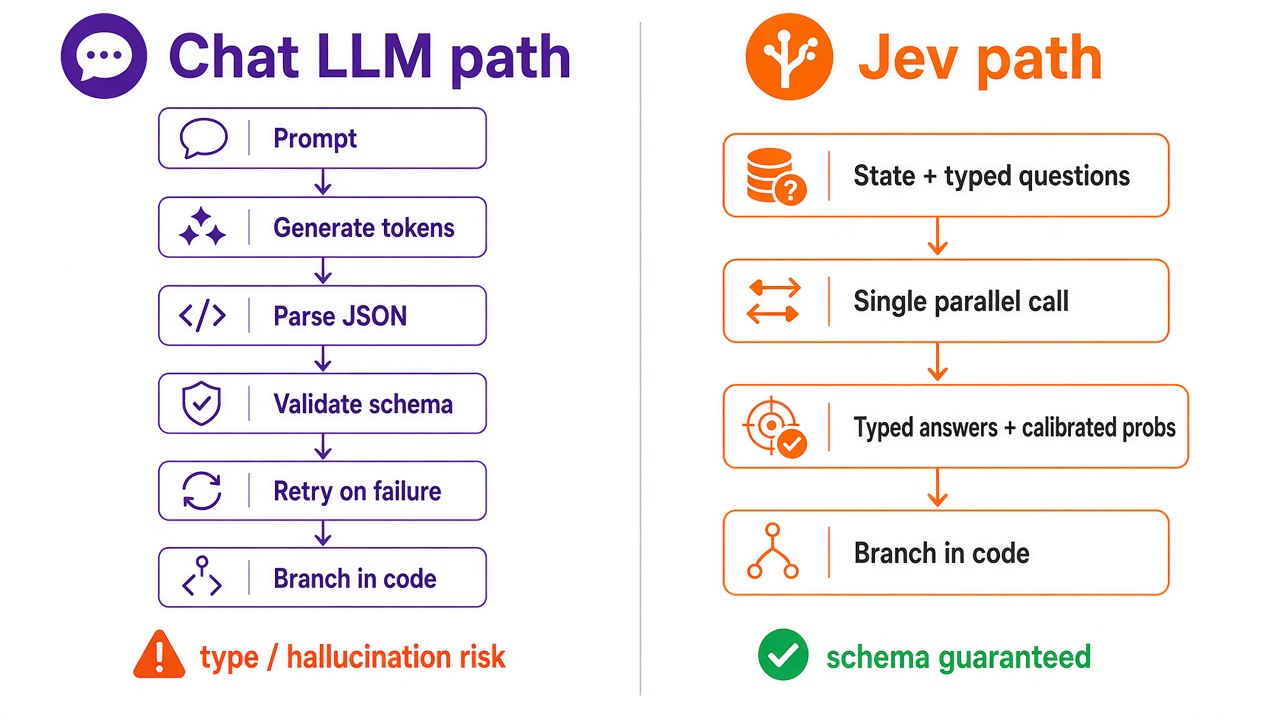
Nuance from their launch post: Jev isn't "a smaller ChatGPT." It's a different interface. If you need prose, keep an LLM. If you need a reliable branch in code, Jev is the interesting option.
Five-minute start
1. Playground (no code)
- Open the TypeSafe Playground and sign in.
- Paste state (any text — ticket, email, CRM note).
- Add questions. Mix Noul (yes/no-ish), Choice, and Score in one call.
Example state:
Hi, I've been trying to connect my Stripe account for 3 days and the
integration keeps failing. I'm losing sales. Please help ASAP.
2. One API call
curl -X POST https://api.typesafe.ai/v1/systemone \
  -H "Authorization: Bearer $TYPESAFE_API_KEY" \
  -H "Content-Type: application/json" \
  -d @- <<'EOF'
{
  "state": "Hi, I've been trying to connect my Stripe account for 3 days and the integration keeps failing. I'm losing sales. Please help ASAP.",
  "model": "jev-latest",
  "questions": {
    "department": {
      "type": "choice",
      "instructions": "Which team should handle this",
      "criteria": {
        "billing": "Payment or subscription issues",
        "technical": "Bugs or integration problems",
        "sales": "Pricing or account questions"
      }
    },
    "frustration": {
      "type": "score",
      "instructions": "How frustrated the customer appears",
      "criteria": [
        "Calm, just stating facts",
        "Frustrated but civil",
        "Very angry, strong language"
      ]
    },
    "is_urgent": {
      "type": "noul",
      "instructions": "The message conveys urgency or time-sensitivity"
    }
  }
}
EOF
You'll get answers like department.choice = "technical", a frustration score, an is_urgent noul, plus confidence and per-option probabilities — the part that actually lets you automate (threshold, escalate, or fall back to a human).
3. Python SDK
pip install typesafe-sdk
# or: uv add typesafe-sdk
from typesafe_sdk import Choice, Noul, Score, TypeSafeClient

client = TypeSafeClient()  # reads TYPESAFE_API_KEY

ticket = "Hi, I've been trying to connect my Stripe account for 3 days..."

response = client.system_one(
    state=ticket,
    questions={
        "department": Choice(
            instructions="Which team should handle this",
            criteria={
                "billing": "Payment or subscription issues",
                "technical": "Bugs or integration problems",
                "sales": "Pricing or account questions",
            },
        ),
        "frustration": Score(
            instructions="How frustrated the customer appears",
            criteria=[
                "Calm, just stating facts",
                "Frustrated but civil",
                "Very angry, strong language",
            ],
        ),
        "is_urgent": Noul(
            instructions="The message conveys urgency or time-sensitivity",
        ),
    },
)

print(response.answers["department"].choice)
print(response.answers["frustration"].score)
print(response.answers["is_urgent"].noul)
4. Agent skill (optional)
If you build with Claude Code / agent tooling, TypeSafe ships a skill (typesafe-ai/skills) so your coding agent knows the API shapes. Useful when you're wiring Jev into a real workflow, not just a curl.
How I'd use this in a real product
- Decompose the decision into independent questions (department + urgency + frustration), not one mega-prompt.
- Branch on probabilities, not only the top label — e.g. escalate if
is_urgentis high and frustration ≥ 1. - Keep an LLM for the human-facing reply; use Jev for the routing layer underneath.
- Measure calibration on your own tickets before you remove human review.
That's the same pattern I push on client AI projects: simplest reliable interface first, add generative freestyle only where you need it (RAG vs fine-tuning is the cousin of this decision).
What to read next
- Launch deep-dive: Introducing System One Models & Jev
- Hands-on: Quick start — TypeSafe docs
Enjoyed this? Let's work together.
I help companies turn AI strategy into shipped, revenue-generating products.